
TL;DR:
- Investment scenario modeling constructs multiple consistent financial futures to test portfolio performance under different conditions. It emphasizes logical scenarios with 3 to 5 cases, including stress tests, to clarify assumptions and identify vulnerabilities. Proper implementation requires regular updates and disciplined evaluation to support evidence-based investment decisions.
Investment scenario modelling is defined as the process of constructing multiple internally consistent financial futures to test how a portfolio or asset performs under different conditions. It is the foundation of sound risk management for self-directed investors and financial professionals alike. Knowing how to model investment scenarios separates reactive decision-making from deliberate, evidence-based planning. The industry standard recommends 3–5 distinct scenarios, including a base case, upside case, downside case, and a stress case, each with defined probability weights. Scenario modelling does not predict the future. It clarifies your assumptions and reveals where your portfolio is most exposed.
How to model investment scenarios: prerequisites and tools
Effective scenario modelling starts with three inputs: historical performance data, a clear set of key financial drivers, and a documented baseline assumption set. Without these, your scenarios will lack the grounding needed to produce useful outputs. Historical data gives you a realistic anchor. Key drivers, such as revenue growth, interest rates, or property yields, tell you which variables actually move your portfolio's value.

The most widely used tool for scenario modelling is Microsoft Excel, specifically its Scenario Manager function and the CHOOSE formula. Google Sheets offers equivalent functionality for those who prefer cloud-based work. Both allow you to set up a scenario selector cell that toggles between assumption sets and recalculates outputs automatically. Technical setup involves linking this selector cell to an input table, then connecting those inputs to your financial outputs such as net present value, internal rate of return, or portfolio balance.
| Tool | Core function | Best suited for |
|---|---|---|
| Excel Scenario Manager | Toggle between saved assumption sets | Structured multi-scenario comparison |
Excel CHOOSE formula | Dynamic output based on selector cell | Flexible, formula-driven models |
| Google Sheets | Cloud-based scenario toggling | Collaborative or remote modelling |
| Purpose-built platforms | Integrated data, tax, and projections | Australian investors needing tax-aware outputs |
Selecting the right key drivers is the single most important decision you make before building. Limit yourself to five to eight variables that genuinely move your outcomes. More than that and your model becomes difficult to maintain and interpret.
Pro Tip: Before building any scenario, write a one-sentence narrative for each case. "In this scenario, the RBA holds rates high for 18 months and property prices fall 12%." That sentence forces you to choose only variables that are consistent with that story.
How do you build internally consistent investment scenarios?
Internal consistency is the most overlooked requirement in scenario modelling. Each scenario must have variables that move together in a logically plausible way. A recession scenario, for example, should include lower GDP growth, higher credit spreads, compressed earnings multiples, and reduced consumer spending simultaneously. Changing one variable while leaving others unchanged produces a scenario that is internally contradictory and therefore useless for planning.
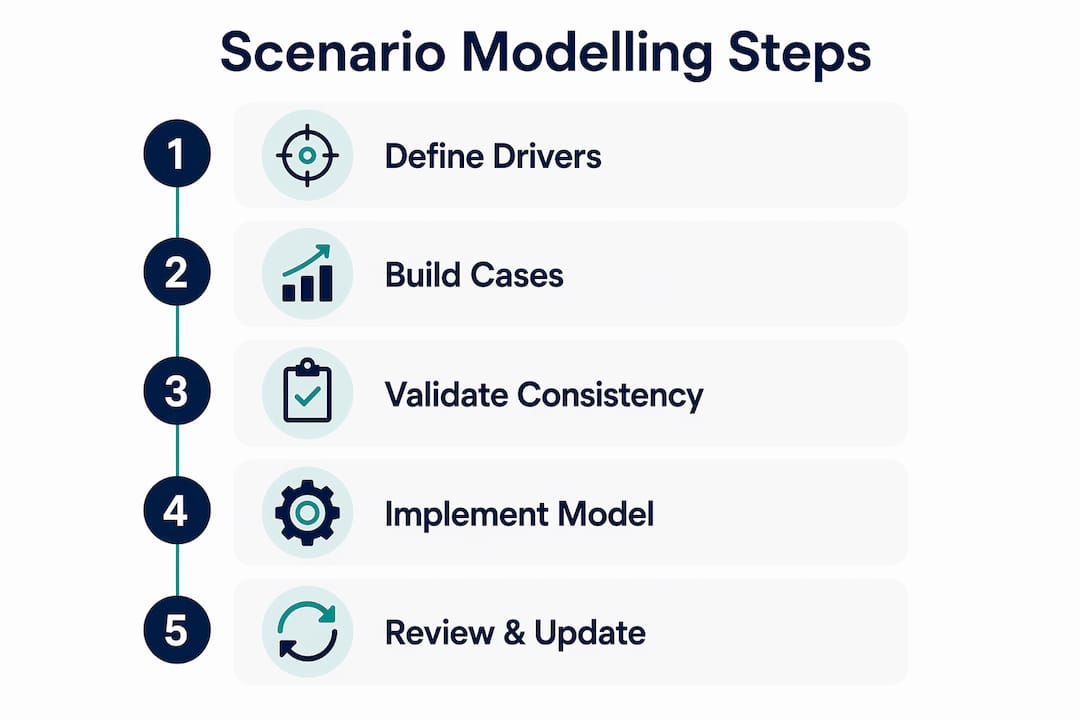
The most reliable approach is to build each scenario around a narrative arc first, then assign numbers to it. A narrative arc describes a coherent future economic or market state. "The Australian economy enters a mild recession driven by sustained high interest rates" is a narrative. From that narrative, you derive the specific variable movements that are consistent with it.
A well-structured model includes four scenario types:
- Base case: The most probable outcome, reflecting current trends continuing. Assign a probability of 50–60%.
- Upside/bull case: Conditions improve beyond expectations. Assign 15–20% probability.
- Downside/bear case: Conditions deteriorate moderately. Assign 15–20% probability.
- Stress/extreme case: A low-probability but severe disruption, such as a market crash or liquidity crisis. Assign approximately 5% probability.
| Scenario type | Typical probability | Key variable direction | Purpose |
|---|---|---|---|
| Base case | 50–60% | Trend continuation | Planning anchor |
| Upside/bull | 15–20% | Growth accelerates | Opportunity sizing |
| Downside/bear | 15–20% | Growth slows | Risk identification |
| Stress/extreme | ~5% | Severe disruption | Liquidity and covenant testing |
Common mistakes to avoid when building scenarios include: assuming variables move independently, copying the base case and simply adjusting one number, failing to document the narrative behind each scenario, and setting probability weights that sum to more or less than 100%.
Pro Tip: Use your stress case to test assumptions you believe are impossible. The scenarios that feel unrealistic are often the ones that reveal genuine portfolio vulnerabilities. Treat the stress case as a creative exercise, not a forecast.
What are the technical steps for implementing scenario models?
Setting up a working scenario model in Excel follows a clear sequence. Each step builds on the last, and skipping steps creates models that are fragile and hard to audit.
- Create a scenario selector cell. Place a dropdown or numbered input cell at the top of your model. This cell controls which scenario is active. Label it clearly, for example "1 = Base, 2 = Bull, 3 = Bear, 4 = Stress."
- Build an input assumption table. List every key driver in rows, with each scenario's values in separate columns. This table is the single source of truth for all scenario inputs.
- Link inputs using the
CHOOSEformula. In each driver cell within your model, write=CHOOSE(ScenarioCell, BaseValue, BullValue, BearValue, StressValue). Changing the selector cell updates every linked input instantly. - Connect inputs to output calculations. Your net present value, cash flow projections, and portfolio balance calculations should all reference the driver cells, not hardcoded numbers.
- Build a summary comparison table. Create a dashboard that shows all four scenarios side by side across your key output metrics. This makes it easy to compare outcomes without navigating through the model.
- Integrate rolling forecast updates. Link your base case inputs to a separate actuals tab. When real performance data arrives each month, update the actuals tab and review whether the base case still holds.
| Model element | Function | Update frequency |
|---|---|---|
| Scenario selector cell | Controls active scenario | As needed |
| Input assumption table | Stores all driver values | Monthly or quarterly |
CHOOSE formula links | Drives dynamic outputs | Automatic on selector change |
| Summary dashboard | Compares scenario outputs | Monthly review |
| Actuals tab | Tracks real vs. modelled performance | Monthly |
Pro Tip: Add a colour-coded "assumption log" tab to your model. Record every time you change an assumption, the date, and the reason. This creates an audit trail and forces disciplined thinking about why you are updating your view.
How do scenario models support risk management and investment decisions?
Scenario modelling functions as what practitioners call pre-traumatic stress conditioning. By working through a severe downside or stress scenario before it happens, you reduce the emotional shock of a real crisis. Investors who have already modelled a 30% portfolio drawdown are far less likely to panic-sell when markets fall sharply. The model does not prevent losses. It prevents fear-driven decisions that lock in those losses permanently.
The shift from single-point forecasting to scenario-based thinking is the most important mindset change for self-directed investors. A single forecast gives you false precision. A range of scenarios gives you a map of the territory. You can see where your portfolio is most exposed, which assumptions carry the most risk, and what conditions would require you to act.
Practical ways to use scenario outputs in your investment decisions include:
- Rebalancing triggers: Set a rule that if the bear case probability-weighted outcome falls below a threshold, you reduce exposure to the most affected asset class.
- Contingency planning: Identify in advance which assets you would sell first in a stress scenario to meet liquidity needs.
- Asymmetric risk identification: Compare the upside and downside cases. If the downside loss is significantly larger than the upside gain, the position carries asymmetric risk worth addressing.
- KPI traffic lights: Assign green, amber, and red thresholds to key outputs. When a metric moves to amber, review the model. When it moves to red, act on your pre-agreed contingency plan.
Optimism bias causes investors to systematically underestimate worst-case outcomes. Including a stress case with a 5% probability weight directly counteracts this tendency. For complex portfolios, Monte Carlo simulations extend this further by running thousands of iterations and producing probability curves across a full range of outcomes. Monte Carlo is particularly useful when you have multiple correlated variables and want to understand the full distribution of possible results, not just four discrete points.
Production-ready models require monthly updates and clear triggers for rebasing when actual results diverge meaningfully from the base case. A model that is not updated becomes a historical document, not a planning tool.
Pro Tip: Set a formal "rebase trigger" in your model. For example, if actual portfolio returns deviate from the base case by more than 10% over two consecutive quarters, rebase all four scenarios from scratch. This keeps your model honest and prevents anchoring to outdated assumptions.
Key takeaways
Effective investment scenario modelling requires internally consistent scenarios, structured technical implementation, and disciplined monthly maintenance to remain a useful decision-making tool.
| Point | Details |
|---|---|
| Build 3–5 distinct scenarios | Include base, upside, downside, and stress cases with defined probability weights summing to 100%. |
| Prioritise internal consistency | Variables within each scenario must move together logically, anchored by a clear narrative arc. |
| Use a scenario selector cell | Link all model inputs through a single toggle cell using the CHOOSE formula for dynamic outputs. |
| Update models with actuals | Review and rebase your model monthly to prevent it becoming disconnected from real performance. |
| Apply outputs to real decisions | Use scenario results to set rebalancing triggers, contingency plans, and traffic-light KPIs. |
The discipline most investors skip
Most investors I work with build a base case and a rough downside, then stop. They call it scenario modelling. It is not. Real scenario modelling requires a stress case that genuinely frightens you, and that discomfort is the point.
The sensitivity analysis trap catches a lot of experienced investors too. Changing one variable at a time feels rigorous, but it misses systemic risk entirely. A recession does not just lower GDP. It compresses margins, widens credit spreads, reduces asset liquidity, and shifts investor sentiment simultaneously. Your model needs to capture that interconnection, or it will understate the real downside.
The other failure I see consistently is model abandonment. Investors spend hours building a scenario model in january, update it once in march, and never touch it again. By july, the model is fiction. Rolling forecasts with rebase triggers are not optional extras. They are what separates a planning tool from a spreadsheet exercise.
Scenario modelling done well is iterative and slightly uncomfortable. You are constantly asking "what if I am wrong?" and building the answer into your plan before the market forces it on you. That discipline, applied consistently, is what gives you genuine confidence in your investment decisions. Not certainty. Confidence grounded in preparation. For investors who want to go deeper on modelling investment returns across different asset classes, the mechanics translate directly from the scenario framework described here.
— Jonathan
Alphaiq: scenario modelling built for Australian investors
Alphaiq is an Australian wealth intelligence platform built specifically for self-directed investors who want to model their financial position across investments, superannuation, property, and retirement in one place.

The platform combines tax-aware financial modelling with scenario simulation, giving you clarity on capital gains, franking credits, debt recycling, and super projections without the cost of ongoing financial advice. You can run multiple investment scenarios, track your base case against actuals, and see how different market conditions affect your retirement income. For investors ready to move beyond spreadsheets, Alphaiq's planning tools provide the structure and real-number outputs that informed decisions require.
FAQ
What is investment scenario modelling?
Investment scenario modelling is the process of building multiple internally consistent financial projections, each representing a different plausible future, to assess portfolio risk and inform decisions. Industry practice recommends 3–5 scenarios including base, upside, downside, and stress cases.
How many scenarios should I model?
The standard framework uses 3–5 distinct scenarios with probability weights: base case at 50–60%, upside and downside at 15–20% each, and a stress case at approximately 5%.
What is the difference between scenario modelling and sensitivity analysis?
Sensitivity analysis changes one variable at a time to measure its isolated impact. Scenario modelling shifts multiple variables simultaneously to reflect a coherent future state, which captures systemic risk that sensitivity analysis misses.
How often should I update my scenario model?
Production-ready models require monthly updates against actual results, with a formal rebase trigger when actuals diverge meaningfully from the base case over consecutive periods.
Can I build a scenario model without advanced software?
Yes. Excel's Scenario Manager and the CHOOSE formula provide all the technical functionality needed for a rigorous four-scenario model. The quality of your outputs depends on the quality of your assumptions, not the complexity of your software. You can also explore investment simulation guides to build your understanding before committing to a full model build.